It's called just doin the damn thing supes. Nice lil pickup of 75 points. Expect to see me in 400 point land in August.
OK boys and girls with out further a dew here is what I did to get where I got. Pretty simple or at least it seems now. A lil special help from Chuchnit and 3oh6 got me where I needed to go. I was there but not all the way. With their advice I got my fix!

All pics are click-able!
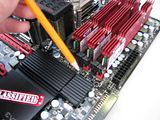
Here is a shot of the jumper I switch to pins 2 & 3 which cured my lonely lil o cold bug. As soon as I flipped the switch my worries were gone...
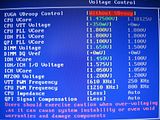
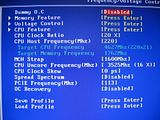
Here are my BIOS screenshots of the settings I tweaked.
Pay attention to the settings in the left column not the right. I don't have the settings saved but merely changed them for this miniature guide. Also your settings might vary. I recommend you use a multimeter to measure your volts. A setting of 1.65v DIMM nets me 1.7v in Windows.
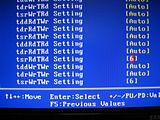
I changed the two settings in the pic from Auto to 6.
Simple enough. I used various timings but mainly these in the end. Be warned that not all RAM is capable of running these speeds at these timings.
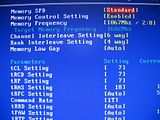
I booted at 220 BCLK and used eleet to get me the rest of my BCLK within Windows.
This last shot I had my QPI Frequency Selection set to 4.8 not Auto. So disregard the Auto setting.
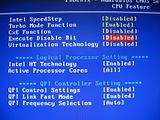
Some benches and what not I had to tweak my VTT or Core volts up more within eleet. Sometimes I ran 115 pcie too. But in a nut shell this is what I used. After the fact I sat around and thought that I might have gotten some more MHz by changing my RAM ratio to 2:6 instead of 2:8. I will be trying this next time.